はじめに
5月24日からオンラインで開催されているMicrosoft Build 2022にあわせ、Azure Container Apps(ACA)がGAになりました。
Buildや他のところで紹介されている通り、Azure Kubernetes Service(AKS)をベースに、スケーリングにはKEDAを、 トラフィックルーティングにはEnvoyを、アプリケーションランタイムとしてDaprを活用したサービスとなっています。
詳しく理解したい方はこちらをご覧いただくとよいと思います。
さて、一連のキーワードをお聞きになってお気づきの方もいらっしゃるかと思いますが、概ね先日からご紹介してきたものと同等の内容です。
つまり、これまでご紹介してきたものはACAでも動作するはずです。今回はその内容をご紹介したいと思います。
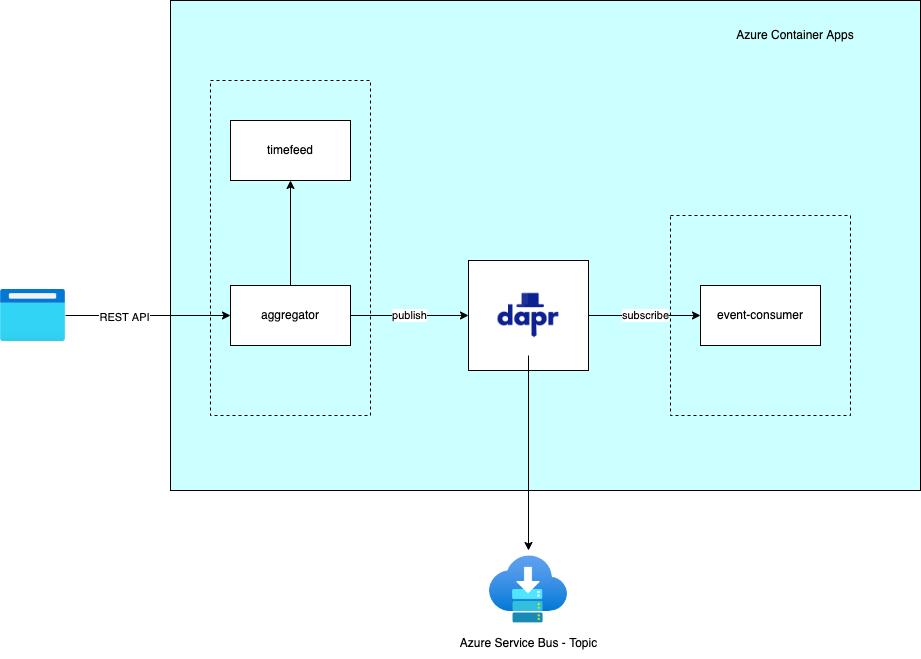
システム構成
AKSのときと同様で、稼働環境がAzure Container Appsとなります。
設定方法
基本的にアプリケーションコードには手を加えずに設定を行いたいと思います。また、今回はBicepを使って設定を行います。 なお、ContainerRegistryとAzure ServiceBusについてはAKSで使用していたものをそのまま利用しています。
Container Apps Environment
aca.bicep
@description('Location for resource')
param location string = resourceGroup().location

@description('Name for azure container apps environment')
param environmentName string
@description('Name for azure application insights')
param insightsName string
@description('Actual name of log analytics workspace')
param workspaceName string


resource insights 'Microsoft.Insights/components@2020-02-02-preview' existing = {
  name: insightsName
}

resource workspace 'Microsoft.OperationalInsights/workspaces@2021-12-01-preview' existing = {
  name: workspaceName
}

resource containerAppsEnvironment 'Microsoft.App/managedEnvironments@2022-03-01' = {
  name: environmentName
  location: location
  properties: {
    daprAIInstrumentationKey: insights.properties.InstrumentationKey
    daprAIConnectionString: insights.properties.ConnectionString
    appLogsConfiguration: {
      destination: 'log-analytics'
      logAnalyticsConfiguration: {
        customerId: workspace.properties.customerId
        sharedKey: workspace.listKeys().primarySharedKey
      }
    }
  }
}

output id string = containerAppsEnvironment.id
output name string = containerAppsEnvironment.name
deploy-aca.bicep
@description('Application name')
param appName string = 'dapr-sample'
@description('location for these resources')
param location string = resourceGroup().location

@description('Name for Azure container apps environment')
param environmentName string = appName

@description('Name for azure application insights')
param appInsightsName string = '${appName}-${uniqueString('ai', resourceGroup().id)}'

@description('Name prefix for log analytics workspace')
param workspacePrefx string = appName

module workspace '../bicep-templates/monitors/query-workspace.bicep' = {
  name: 'query-workplace-${workspacePrefx}'
  params: {
    workspaceNamePrefix: workspacePrefx
  }
}

module acaEnvironment '../bicep-templates/containers/aca.bicep' = {
  name: 'deploy-aca-envinronment-${environmentName}'
  params: {
    location: location
    environmentName: environmentName
    insightsName: appInsightsName
    workspaceName: workspace.outputs.name
  }
}

output id string = acaEnvironment.outputs.id
ここでは内容を省略していますが、LogAnalytics WorkspaceとApplication Insightsを作成後、Azure Container Apps Environmentを作成します。
インフラストラクチャとしては作成はここまでです。
アプリケーション
ACAではアプリケーションのデプロイもBicep(AZ CLIなど)で行います。代表としてAggregatorとEvent-consumerアプリケーションの Yamlをご紹介します。
aggregator.yaml
@description('Application name')
param appName string = 'dapr-sample'
@description('location for these resources')
param location string = resourceGroup().location

@description('Name for Azure container apps environment')
param environmentName string = appName

@description('container registry name')
param acrName string

@description('Application insights name')
param insightsName string = '${appName}-${uniqueString('ai', resourceGroup().id)}'

resource acr 'Microsoft.ContainerRegistry/registries@2021-12-01-preview' existing = {
  name: acrName
}

resource environment 'Microsoft.App/managedEnvironments@2022-03-01' existing = {
  name: environmentName
}

resource queryAi 'Microsoft.Insights/components@2020-02-02-preview' existing = {
  name: insightsName
}

resource aggregator 'Microsoft.App/containerApps@2022-03-01' = {
  name: 'aggregator'
  location: location
  properties: {
    managedEnvironmentId: environment.id
    configuration: {
      secrets: [
        {
          name: 'container-regsitry-password'
          value: acr.listCredentials().passwords[0].value
        }
      ]
      registries: [
        {
          server: acr.properties.loginServer
          username: acr.name
          passwordSecretRef: 'container-regsitry-password'
        }
      ]
      ingress: {
        external: true
        targetPort: 8080
      }
      dapr: {
        enabled: true
        appId: 'aggregator'
        appProtocol: 'http'
        appPort: 8080
      }
    }
    template: {
      containers: [
        {
          image: '${acrName}.azurecr.io/dapr-sample/aggregator-javaagent:0.1.0-SNAPSHOT'
          name: 'aggregator'
          env: [
            {
              name: 'JAVA_TOOL_OPTIONS'
              value: '-Dreactor.netty.http.server.accessLogEnabled=true'
            }
            {
              name: 'TIMEFEED_HOST'
              value: 'http://localhost:3500'
            }
            {
              name: 'TIMEFEED_BASE'
              value: '/v1.0/invoke/timefeed/method/'
            }
            {
              name: 'ORDER_TOPIC_HOST'
              value: 'http://localhost:3500'
            }
            {
              name: 'ORDER_TOPIC_BASE'
              value: '/v1.0/publish/sample-pubsub/orders'
            }
            {
              name: 'SPRING_MAIN_BANNER-MODE'
              value: 'off'
            }
          ]
        }
      ]
    }
  }
}
event-consumer.yaml
@description('Application name')
param appName string = 'dapr-sample'
@description('location for these resources')
param location string = resourceGroup().location

@description('Name for Azure container apps environment')
param environmentName string = appName

@description('container registry name')
param acrName string

@description('Application insights name')
param insightsName string = '${appName}-${uniqueString('ai', resourceGroup().id)}'

resource acr 'Microsoft.ContainerRegistry/registries@2021-12-01-preview' existing = {
  name: acrName
}

resource environment 'Microsoft.App/managedEnvironments@2022-03-01' existing = {
  name: environmentName
}

resource queryAi 'Microsoft.Insights/components@2020-02-02-preview' existing = {
  name: insightsName
}

resource eventConsumer 'Microsoft.App/containerApps@2022-03-01' = {
  name: 'event-consumer'
  location: location
  properties: {
    managedEnvironmentId: environment.id
    configuration: {
      secrets: [
        {
          name: 'container-regsitry-password'
          value: acr.listCredentials().passwords[0].value
        }
        {
          name: 'ai-connection-string'
          value: queryAi.properties.ConnectionString
        }
      ]
      registries: [
        {
          server: acr.properties.loginServer
          username: acr.name
          passwordSecretRef: 'container-regsitry-password'
        }
      ]
      dapr: {
        enabled: true
        appId: 'event-consumer'
        appProtocol: 'http'
        appPort: 3000
      }
    }
    template: {
      containers: [
        {
          image: '${acrName}.azurecr.io/dapr-sample/event-consumer:1.1.0'
          name: 'event-consumer'
          env: [
            {
              name: 'APPLICATIONINSIGHTS_CONNECTION_STRING'
              secretRef: 'ai-connection-string'
            }
          ]
        }
      ]
    }
  }
}
propertiesの中身が以前AKSでデプロイの際に使用したYamlのspec.template.annotationsやspec.template.spec.containersの内容に似ていますね。 このあたりからもベースとなっているのがAKSであるということがわかってくると思います。
Component
続いてAzure Service Busとの接続部分です。こちらもBicepで登録します。
sample-pubsub.yaml
@description('Application name')
param appName string = 'dapr-sample'

@description('Name for Azure container apps environment')
param environmentName string = appName

@description('Azure service bus namespace')
param serviceBusNamespace string

resource environment 'Microsoft.App/managedEnvironments@2022-03-01' existing = {
  name: environmentName
}

resource busAuthRoles 'Microsoft.ServiceBus/namespaces/AuthorizationRules@2021-11-01' existing = {
  name: '${serviceBusNamespace}/RootManageSharedAccessKey'
}

resource components 'Microsoft.App/managedEnvironments/daprComponents@2022-03-01' = {
  name: 'sample-pubsub'
  parent: environment
  properties: {
    componentType: 'pubsub.azure.servicebus'
    version: 'v1'
    ignoreErrors: false
    metadata: [
      {
        name: 'connectionString'
        value: busAuthRoles.listKeys().primaryConnectionString
      }
    ]
    scopes: [
      'aggregator'
      'event-consumer'
    ]
  }
}
こちらの内容もAKSで利用したものと似ています。ちなみに、ACAの場合、いまのところnamespaceを分割するような機能はなさそうなので AKSの時にnamespaceごとにわけていた設定を1つにまとめています。
注意事項
ACAがGAとなってもいくつかまだ制約事項があります。
Component部分Managed IDも未サポートです。上の例でもService Busへの接続には connectionString を用いています。
同様にコンテナイメージのアクセス部分もID/PWD方式としなければなりません。
このためまずACRの設定変更を行っています。
# ACAからユーザー/パスワードでアクセスできるようにする
az acr update -n ${ACR_NAME} --admin-enabled true
さらに、各アプリケーションのところでは、以下の設定を入れてイメージ取得ができるようにしています。
      secrets: [
        {
          name: 'container-regsitry-password'
          value: acr.listCredentials().passwords[0].value
        }
      ]
      registries: [
        {
          server: acr.properties.loginServer
          username: acr.name
          passwordSecretRef: 'container-regsitry-password'
        }
      ]
Bicepを利用しているので秘匿文字列等はコード上には残りませんが、Managed IDがサポートされたらもう少しスッキリするかもしれませんね。
〜2022年10月19日追記〜
Azure Container AppsでManaged IDがサポートされました!!
デプロイと実行
紹介していないファイルも含めてこれらのBicepファイルをすべてデプロイしたら完成です。
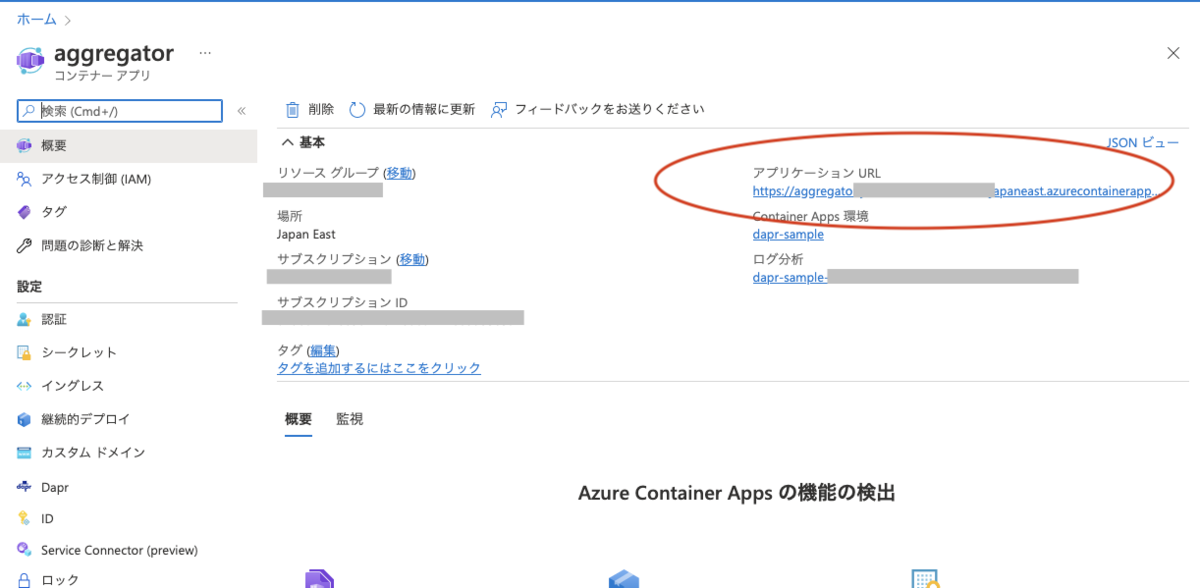
Azureポータルの「コンテナアプリ」からAggregatorを選択して、右側に表示されている「アプリケーションURL」がExternal Ingressで公開されているURLです。こちらをコピーしてアクセスすればテスト可能です。
今回実現できなかったこと
AKSではできていて、ACAのデプロイではできなかったことがひとつあります。JavaAgentの導入です。ACAではInit Containerに該当する機能は提供されません。 このためあらかじめAgent JarファイルをDockerイメージにコピーして利用しようとしたのですが、なぜかうまく動きませんでした。 たぶんイメージの作成の仕方の問題か、Agentに関する設定漏れがあったんだと思います。 この件はいずれ対応して機会があればご紹介したいと思います。
おわりに
AKSとACA、どちらを選べばよいか、また悩みが増えたと感じている方もいらっしゃるかと思います。 しかし、今回ご紹介したように、AKSのAdd-onなどを適切に導入し、アプリケーションを適切に設計するとACAでもAKSでも動かすことがきます。 まずはACAで稼働し、のちに何かの理由でAKSに移行しようとすることも可能になってきます。
こうした特性を理解しておけば選択肢が増えたとしても安心ですね。
今回ご紹介したコードは以下のGitHub Repositoryで公開しています。なお、今回追加したのは settings/acaフォルダ 以下のファイルのみで、 それ以外は以前AKSで利用したもののままです。
最後に宣伝。 弊社エンジニアが協力した、「AKSのセキュリティ対策に関するホワイトペーパー」の3,4章がMicrosoftから公開されました。
ぜひこちらもご覧ください。
また、私たちは、Azure・AKSを活用したシステムのSIや内製化のお手伝いをさせていただいております。 Azureやコンテナ技術の知見を持つエンジニアが対応いたします。ご相談等ありましたらぜひご連絡ください。
